
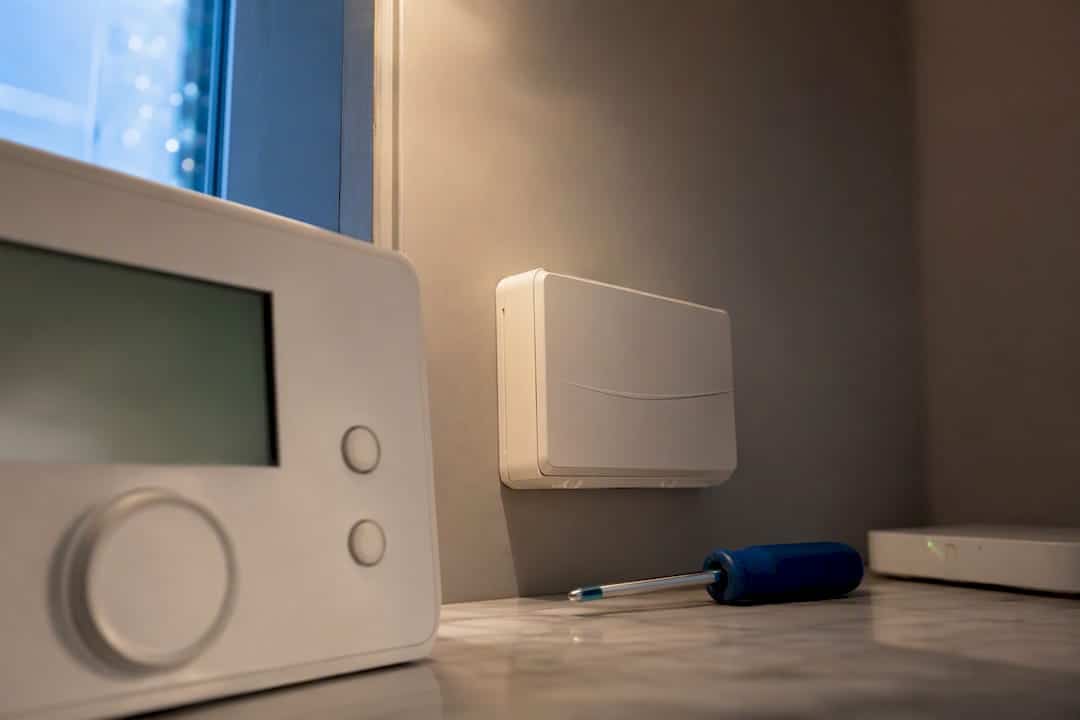
Smart thermostats influence energy-performance modelling because the Home Energy Model runs on a half-hourly timestep and reads control behaviour as structured schedules, not marketing features. A thermostat’s setpoints, setbacks, and any predictive or weather-compensating logic only change a modelled outcome when an assessor can document them as recognised control inputs. Without that evidence, HEM and current EPC methods default to standard assumptions, regardless of how sophisticated the app behind the thermostat looks.
TL;DR:
- Documented schedules, such as setpoint times and advanced control features, are essential for accurate modeling of smart thermostat behavior in HEM.
- Relying solely on app features or occupant descriptions without exporting or verifying schedules risks default assumptions that ignore real control logic.
- Half-hourly resolution in HEM allows better capture of load-shifting and flexibility benefits, but these won’t be reflected in EPC if not properly evidenced.
- Evidence collection should include schedule exports, manufacturer documentation, and verification of zoning and control logic for more reliable assessment outcomes.
- The Hive system’s control architecture centers on the receiver’s logic, making schedule documentation crucial, especially when automation or geolocation features are involved.
Table of Contents
- How does a Hive thermostat work within HEM’s control modelling?
- How common smart thermostat features map to HEM inputs
- What smart control evidence means for EPC and HEM results
- A checklist for documenting smart controls before an assessment
- What a Hive thermostat system actually consists of
- How the Hive thermostat communicates with the heating system
- How occupants interact with and control the Hive thermostat
- Scheduling, geolocation, and learning features that set Hive apart
- Connecting the Hive thermostat with other smart home devices
- Security and privacy considerations for Hive thermostat data
- Author perspective: prioritising actions for practitioners
- Sources
How does a Hive thermostat work within HEM’s control modelling?
The question “how does Hive thermostat work” matters to assessors for one reason: HEM does not care what a device is branded, it cares what schedule it produces. The Home Energy Model consultation confirms HEM replaces the monthly calculations used in SAP with a half-hourly simulation, built on the BS EN ISO 52016-1:2017 heat balance method. That resolution lets the model calculate operative temperature separately for every half-hour of a modelled year, rather than averaging a whole month into one figure.
Controls sit inside this engine as discrete objects. According to HEM-TP-17: Controls, heating and hot water systems are governed by objects such as SetpointTimeControl and CombinationTimeControl, which supply an on/off state and a numeric target temperature for each timestep. A thermostat that runs a weekday setback from 22:00 to 06:00 is not modelled as “smart”. It is modelled as a specific setpoint schedule, timestep by timestep.
Once a schedule exists, HEM works out demand by solving heat balance equations for each half-hour and interpolating system output against that demand, as set out in the HEM consultation technical summary. If the heat source cannot deliver enough capacity to hit the requested setpoint, the model records unmet demand rather than silently assuming comfort is achieved.
Several other inputs shape how efficiently that demand gets satisfied:
- Weather compensation settings, which adjust flow temperature against outdoor conditions
- Flow and return temperature limits, which constrain how hard an emitter or heat source can work
- Ecodesign control class (rated I to VIII), which affects assumed emitter efficiency
- Zonal setpoint differences, where separate areas run distinct schedules rather than one house-wide target
Every one of these is a documented HEM-TP-17 input, not a generic “smart” label.
How common smart thermostat features map to HEM inputs
Translating a thermostat’s marketing features into modelling inputs is where most assessments either gain accuracy or quietly lose it. A weekly programme built in an app becomes a SetpointTimeControl schedule once exported or evidenced. Predictive charging, most relevant to storage heaters and heat batteries, estimates the next day’s heating requirement from forecast heating degree-hours and sets a target charge level, a logic HEM-TP-17 documents explicitly through ChargeControl objects. TRV-based zoning, where individual rooms run different targets, appears in HEM as separate temperature controls per zone rather than a single whole-dwelling setpoint.
Three distinct control logics recur across HEM’s technical papers:
- Manual control — an occupant sets and adjusts a target temperature with no automated schedule behind it.
- Automatic control — the system switches off once a measured or forecast condition, such as a temperature threshold, is met.
- Predictive control — the system estimates future demand from degree-hour forecasts and pre-loads output accordingly, most common in heat batteries and storage heating.
The limitation worth flagging to landlords: an app-only feature that has never been exported as a schedule is treated by the model as unknown, and unknown means default. A geofencing feature that quietly drops the setpoint when every phone leaves the postcode looks impressive to an occupant, but unless that behaviour is evidenced as a recorded schedule, HEM cannot distinguish it from a thermostat left untouched.
Two scenarios show the difference in practice. A household using off-peak electricity tariffs and shifting a heat battery’s charge window to overnight hours can, when that schedule is documented, be modelled as reduced peak demand and altered running costs. A household relying purely on geofenced setback with no recorded schedule will be modelled on a standard occupancy pattern instead, because the model has nothing else to work from.
Pro Tip: Ask tenants or occupants to export their thermostat’s schedule screen as a screenshot or CSV before an assessment. That single piece of evidence often does more to secure an accurate input than a conversation about which features the app claims to offer.
What smart control evidence means for EPC and HEM results
Current RdSAP and SAP methods ask assessors to record a control type, typically a programmer, room thermostat, or TRVs, and that record rarely distinguishes one smart brand from another. A dwelling with a learning thermostat and a dwelling with a basic programmable one can receive identical control scores under RdSAP if neither meets a recognised control class or has a proven schedule attached to the record.
HEM changes what is possible, not automatically what happens. Because it runs at half-hourly resolution, it can, in principle, quantify load-shifting, reduced peak demand, and the value of flexible tariffs, benefits a monthly calculation method simply cannot see. The HEM consultation is explicit that a reduced timestep improves the treatment of smart technologies, storage, and flexibility, and researchers involved in the consultation view this half-hourly structure as a way of future-proofing modelling against exactly this kind of control behaviour.
From the consultation: HEM’s shorter timestep is designed to better capture smart technologies, storage systems, and load-shifting behaviour that monthly SAP calculations could not represent.
Whether that modelling capability reaches the certificate a landlord actually receives is a separate question. HEM-TP-01 describes HEM as a core calculation engine wrapped by separate components, and the EPC wrapper that decides which HEM inputs feed into a certificate is still under development. Until that wrapper is finalised, the safe assumption is that:
- Documented schedules and manufacturer specifications strengthen an assessor’s case for entering an advanced control rather than a default
- On-site verification (checking the app schedule against actual thermostat behaviour) carries more weight than a tenant’s description of features
- Any benefit that isn’t captured by the eventual EPC wrapper simply won’t appear on the certificate, however well it performs inside the HEM core
Landlords upgrading heating controls now should treat evidence gathering as insurance for whichever wrapper rules eventually apply, not as a guaranteed rating boost today.
A checklist for documenting smart controls before an assessment
Getting a fair, model-ready input recorded comes down to evidence, not enthusiasm about a thermostat’s app. Assessors and landlords preparing for a HEM-aligned assessment should work through the following before the visit:
- Gather the control type and schedule. Export or screenshot the exact setpoint and setback times, not a verbal description of “it turns down at night”.
- Collect proof of advanced logic. Manufacturer documentation for predictive charging, weather compensation, or automatic cutoff behaviour should accompany the schedule.
- Map TRV zoning. Note which rooms run independent setpoints and record those temperatures separately rather than averaging them.
- Record flow and return temperature settings, particularly on heat pumps or condensing boilers where these affect modelled efficiency.
- Ask occupants directly about geofencing, learning behaviour, and automation, then verify the answer against the app rather than accepting it at face value.
- Apply conservative defaults where evidence is missing, and note in the assessment exactly why the default was used and what effect it likely had on the rating.
- Escalate complex systems. Multi-zone predictive logic or heat batteries paired with time-of-use tariffs often warrant specialist HEM modelling support rather than a standard walkthrough.
Pro Tip: If a tenant mentions a feature the assessor hasn’t seen evidenced, write it down as a follow-up item rather than ignoring it. A missed automation feature costs nothing to note and can be verified before the report is finalised.
What a Hive thermostat system actually consists of
A Hive thermostat installation is built from three linked components rather than a single device on the wall. A wall-mounted or portable thermostat unit provides the interface occupants interact with directly. A receiver, typically wired into the boiler or heating system, translates the thermostat’s instructions into on/off or modulation signals the heating equipment understands. A hub connects that receiver to a home broadband router, giving the whole system internet access so it can synchronise with a cloud-based scheduling service.
This three-part structure matters for HEM purposes because it clarifies where the actual control decision is made. The thermostat and app present a schedule to the occupant, but the receiver is what physically switches the heating system, and that switching behaviour, if evidenced, is what an assessor should be recording. A basic system with just a thermostat and receiver behaves differently to one running an additional Hive smart plug or multi-zone valve setup, which can introduce independent zoning behaviour worth capturing separately in a HEM-style schedule.
Hive systems are compatible with a range of boiler types, including combi, system, and heat-only boilers, and with some heat pump installations depending on the receiver used. That compatibility range is worth checking against the specific property before assuming a standard schedule applies, since heat pump control logic often behaves differently to a simple boiler on/off cycle, particularly around weather compensation.
How the Hive thermostat communicates with the heating system
Communication between the Hive thermostat and the boiler runs through a dedicated receiver rather than a direct connection to the boiler itself. The thermostat talks to the receiver over a wireless protocol, and the receiver then closes or opens the circuit that controls the boiler’s demand signal, much as a traditional wired thermostat would, but without the cable.
For internet connectivity, the hub bridges that local wireless link to the home network over Ethernet, plugging into the router directly. Once connected, schedule changes made through the mobile app travel from the cloud service, through the hub, to the thermostat and receiver, meaning a schedule adjustment made away from the property still reaches the heating system in near real time, provided the home broadband connection stays up.
This matters practically in two ways. First, a broadband outage doesn’t necessarily stop heating altogether. Most Hive setups fall back to the last schedule stored locally on the thermostat and receiver, so the system keeps operating on autopilot even without internet access, though remote adjustments won’t reach it until connectivity returns. Second, this receiver-based architecture is precisely why documentation matters for assessments: the schedule that actually governs the boiler lives in the receiver’s logic, not merely in whatever the app displays, so verifying the two match is worth the extra few minutes on-site.
How occupants interact with and control the Hive thermostat
Three separate control routes exist across the Hive range, and each produces a different kind of evidence for anyone trying to document the behaviour for an assessment. The mobile app is the primary interface, letting users build weekly schedules, adjust temperatures remotely, and review or change settings from anywhere with a data connection. The physical thermostat unit itself allows manual adjustment without opening the app, useful for a quick, immediate temperature change that doesn’t touch the underlying schedule.
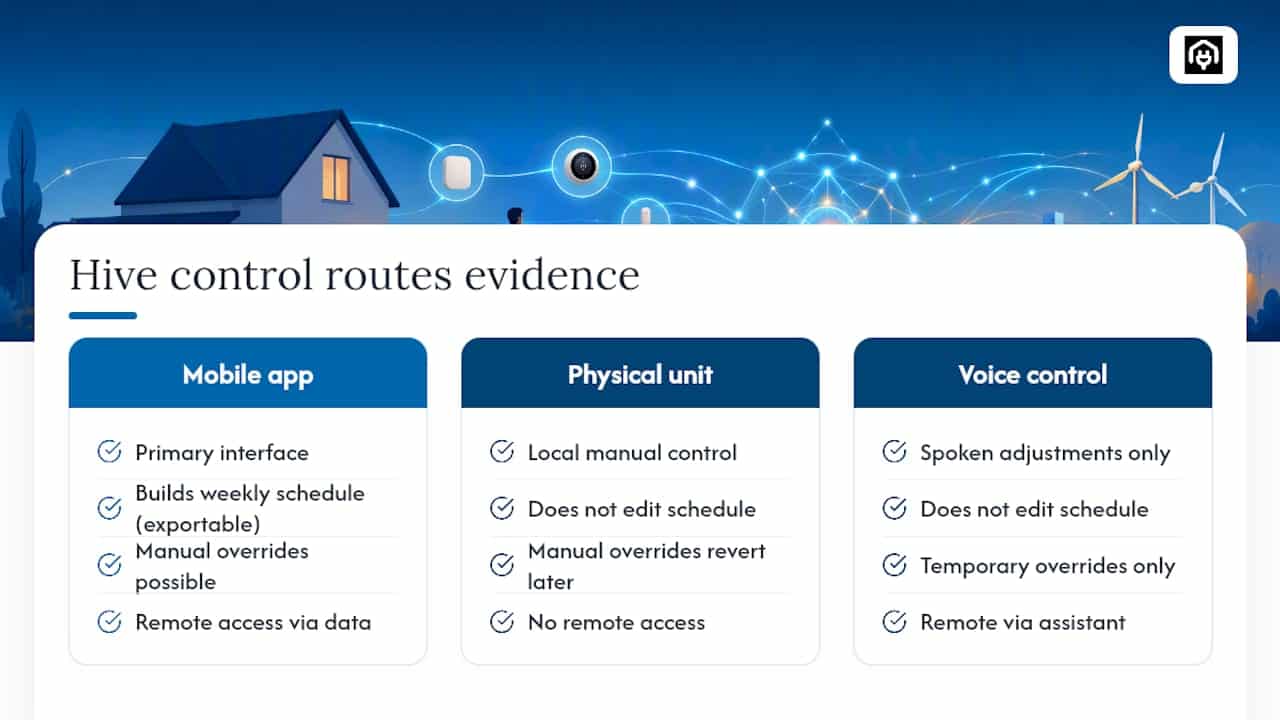
Voice control adds a third route on compatible systems, allowing spoken temperature adjustments through a linked voice assistant rather than either the app or the physical unit. This is convenient for occupants but produces the least reliable evidence trail for an assessor, since voice-triggered changes are typically temporary overrides rather than schedule edits, and won’t show up as a lasting change to the recorded programme.
The distinction between manual overrides and scheduled control is the one occupants and even some assessors blur most often. Turning a thermostat up by hand, whether through the app, the physical dial, or a voice command, temporarily overrides the schedule but usually reverts once the next scheduled event triggers. That override behaviour has no lasting effect on the underlying weekly programme and, from a modelling standpoint, is not the same thing as an automated setback. Only the schedule itself, viewed and exported from the app’s programme screen, represents the kind of documented control behaviour that can genuinely change a modelled input.
Scheduling, geolocation, and learning features that set Hive apart
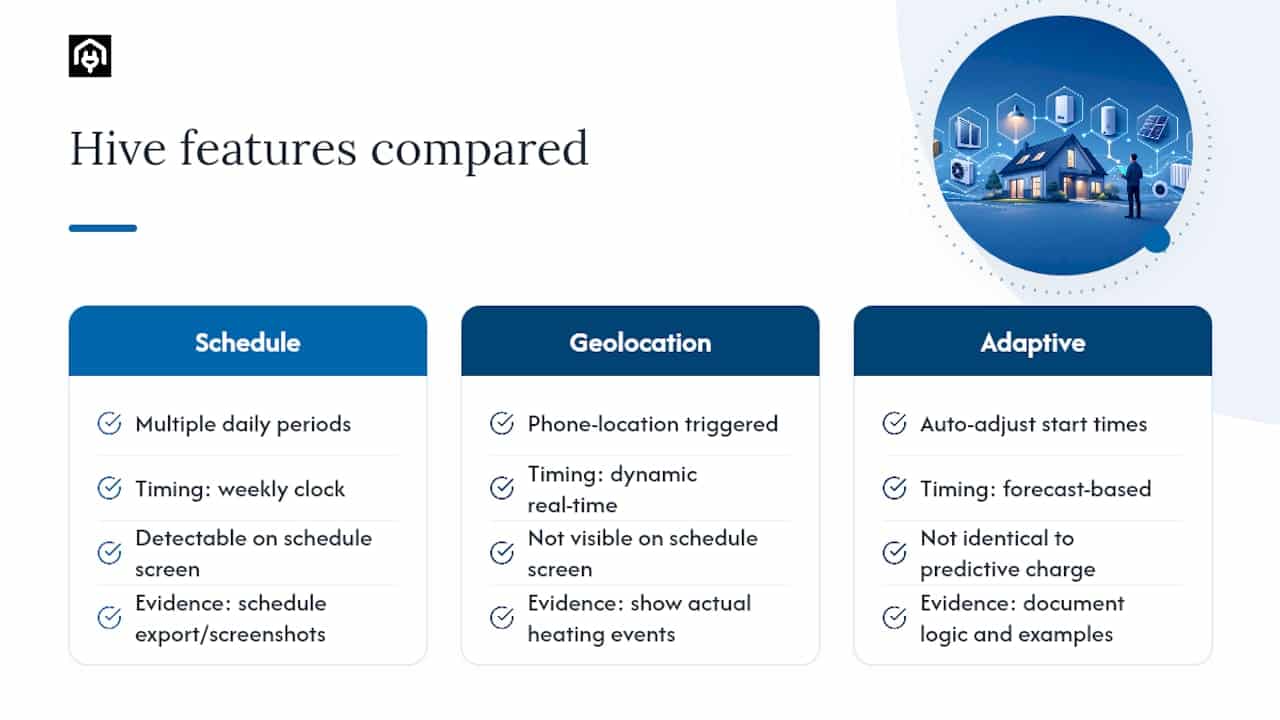
Standard weekly scheduling lets occupants set different temperature targets for different times of day across each day of the week, typically split into multiple heating periods rather than one block. That flexibility alone accounts for most of the difference between a documented smart schedule and a basic single-setpoint system, since it can represent genuinely varied occupancy patterns rather than one flat target held all day.
Geolocation, marketed as a location-based feature on some Hive models, uses a smartphone’s position to detect when occupants are away from the property and can trigger a setback automatically, then reverse it as they approach home. This is the feature most likely to be invisible to a modelling exercise unless specifically evidenced, precisely because it operates dynamically rather than on a fixed weekly clock. An assessor cannot infer a geolocation-driven pattern from the standard schedule screen alone; it needs to be described and, ideally, shown as a pattern of actual heating events over a representative period.
Some models in the range also offer a form of adaptive scheduling, where the system adjusts start times based on how long a property has previously taken to reach a target temperature, factoring in outdoor conditions to bring the home to temperature by a set time rather than simply switching on at a fixed hour. This behaves similarly in principle to the predictive charge logic HEM already recognises for heat batteries and storage heaters, in that it works from a forecast rather than a flat clock trigger, though it is not identical in mechanism and needs its own documentation rather than being assumed equivalent.
Connecting the Hive thermostat with other smart home devices
The Hive ecosystem extends beyond room heating control into a broader set of connected devices, all managed through the same hub and app. Smart plugs allow scheduling and remote switching of individual appliances. Motion sensors and smart lighting can be linked to occupancy-based automations. Leak and smoke detection accessories feed alerts back through the same app interface used for heating.
Third-party integration is where the system’s reach extends further still, since compatible smart speaker platforms allow voice control of the thermostat alongside other connected devices in the same household, and some setups permit basic automations, such as lighting responding to a heating schedule change, though the depth of that integration varies by which third-party platform is involved and which specific Hive products are installed.
For HEM and EPC purposes, this wider ecosystem rarely changes the heating-specific evidence an assessor needs, but it does introduce a practical complication worth flagging to landlords: a property with several linked automations can make it harder for an occupant to describe, from memory, exactly what triggers a heating change versus a lighting change. Where multiple automations interact, asking for a direct export of the heating schedule specifically, rather than a general description of “the smart home setup”, avoids conflating unrelated automations with the control behaviour that actually matters for a HEM input.
Security and privacy considerations for Hive thermostat data
Hive systems route schedule and usage data through a cloud service to enable the remote app control that makes the product useful in the first place, which means account security is not a peripheral concern but a direct line to the physical heating system in the property. A compromised account could, in principle, allow unauthorised access to remote heating controls, making standard account hygiene, a strong unique password and available two-factor authentication, a sensible baseline for any landlord managing several properties through one account structure.
Data privacy is the other side of the same coin. Usage patterns, including when a property is heated and, on models with geolocation enabled, approximate occupancy timing, represent a meaningful data trail about a household’s daily routine. Landlords managing tenanted properties should be conscious that occupant-level data of this kind sits with the account holder, whether that is the tenant or the landlord, and clarity over who controls that account matters as much as any technical security setting.
None of this changes the HEM or EPC evidence question directly, but it does shape a practical recommendation for anyone gathering documentation for an assessment: request schedule exports and screenshots directly from the account holder rather than asking for account credentials, and keep any collected evidence limited to the heating schedule itself rather than broader usage history that isn’t relevant to the assessment.
Author perspective: prioritising actions for practitioners
The temptation for assessors is to treat smart thermostats as a footnote. That’s backwards. HEM will reward documented, model-ready schedules whether or not the brand behind them is fashionable, so the priority is capturing evidence now, before a wrapper decision forces conservative defaults on properties that could have shown genuine flexibility. Cosmetic app features matter less than a clean, exportable schedule. For anything more complex than a single-zone system, specialist HEM guidance is worth the call before the assessment, not after.
— Danny
Property owners preparing for HEM-aligned assessments don’t need to guess which evidence will hold up. Homeenergymodel’s home energy assessment service helps landlords and developers document control schedules correctly, request accurate EPC inputs, and avoid conservative defaults that undervalue genuinely flexible heating systems. For a broader look at how different modelling approaches treat smart controls, the guide to home energy model types for landlords is a useful next read before booking an assessment.
Sources
- Home Energy Model (HEM) consultation — UK government
- HEM-TP-17: Controls — modelling controls within the Home Energy Model (technical paper)